Terra Clement's Archive

Office of General Counsel Has a New Home

by   |  02.16.26  |  Announcements

We have moved our resources from the public website (acu.edu) to my.acu.edu to provide employees with a more centralized and secure location for internal resources. You can now easily access University forms, policies, contract information, and the Whistleblower Hotline by navigating to the “Pages” tab on the my.acu.edu homepage.

If you have questions or need assistance navigating the new site, please contact Laura Ashlock at ext. 2393 or email ogc@acu.edu.

AI Roundtable Conversation

by   |  02.16.26  |  Announcements

IT will be hosting a roundtable conversation and lunch about AI usage on Tuesday, March 10th at noon. This will be an opportunity to share ways that we are already using AI on campus to improve efficiency and the way we do business. Space is limited. Sign-up at this link For questions, reach out to Eric Lemmons at eric.lemmons@acu.edu.

Benefits Tip: Employee Assistance Program

by   |  02.16.26  |  Announcements, Benefits

You and your covered dependents have access to The Standard’s Employee Assistance Program (EAP). This confidential service offers free over-the-phone counseling any time, day or night, to help you with a variety of personal situations. The EAP also provides up to 3 counseling sessions for both you and your covered dependents, either in person or over the phone. Counselors can help with concerns such as emotional well-being and health, relationships, parenting and addiction. To contact the EAP, call 888-293-6948, 24 hours a day, seven days a week, to talk to a professional counselor. Register online HERE!

ISA International Food Festival – March 21 | “A Taste of Home”

by   |  02.13.26  |  Announcements

The International Students Association (ISA) warmly invites faculty and staff to participate in our annual International Food Festival on March 21st from 6PM-8PM at Hillcrest Church of Christ! Tickets are $5 for students and $10 for general admission. This year’s theme, “A Taste of Home,” celebrates the flavors, traditions, and stories that connect us to our home countries. Faculty and staff who would like to represent their home country by sharing a favorite dish or cultural cuisine are encouraged to join us for this special event. Interested in learning more? Please contact Veronica Summers at vdw09a@acu.edu. We would love to have you be part of this meaningful celebration of culture and community! Details of the event can be found here!

Biology Blood Drive

by   |  02.11.26  |  Announcements

The Department of Biology supports Hendrick Medical Center each year by sponsoring an ACU Blood Drive! We have been very successful in having students, professors, and staff visit the Hendrick bus and give life saving blood to the Hendrick Blood Bank. Our blood drive will be held on February 26th from 9:00 A.M. – 2:00 P.M. The bus will be parked between the HAL and OSC in the Nelson parking lot during those times. Please come and give blood and then come to HWRC’s 2nd for a snack and juice!

Limited-Time Offers Designed for Wildcats

by   |  02.06.26  |  Announcements

We’re committed to helping YOU thrive. These offers are built to help you save more, borrow smarter, and tackle goals faster. From checking accounts that reward you to scholarship opportunities to flexible loan options, there’s something for every stage of life. Learn more!

Faculty/Staff Appreciation at ACU Basketball

by   |  02.06.26  |  Announcements

Join us as we celebrate our incredible ACU faculty and staff at the Faculty & Staff Appreciation Game! Enjoy an afternoon of Wildcat basketball on February 21st at 3:00 P.M. in Moody Coliseum, as we recognize the dedication and impact of those who make ACU special.  Each Faculty & Staff member gets in for free with their ACU ID and can claim up to 3 free general admission tickets with this link.

Reporting time for Inclement Weather

by   |  02.06.26  |  Announcements

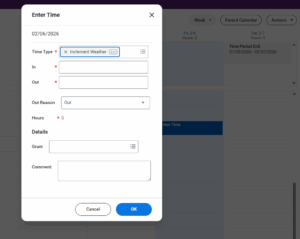
Due to the inclement weather on Monday, January 26 through Wednesday, January 28th, please see the following information regarding submitting time:

Non-Exempt employees Will go into their timesheet and log as normal, but instead of the time type “worked time” they will need to click the related actions icon to log it as “Inclement Weather”. Non-Exempt employees who worked during the closure, including checking work email and voice mail, should record the time worked as “worked time” and the remainder of their regular schedule as inclement weather.

Exempt employees need not take any action due to the weather.

Note: Employees already taking vacation days should still record the time off as vacation, not inclement weather.

Each department needs to decide how to handle its student employees. Departments may: 1) allow students to work extra hours to make up the time missed, 2) pay your student employees their regularly scheduled hours during the closure. OR 2) inform students that they should not log missed hours for the closure days.
Know a High School Student? Help Them Get a Head Start at ACU

by   |  02.06.26  |  Announcements

Do you know a motivated high school student—maybe a child, relative, neighbor, or church member—who’s ready for college-level work? ACU’s Rising Scholars Online dual enrollment program is now accepting applications! Students in grades 10–12 can earn ACU credit online while still in high school, with engaging courses, supportive instruction, and a strong emphasis on academic excellence and Christian community. Encourage them to apply today and take their first college course with ACU. Learn more HERE!

Benefits Tip: Confirm Beneficiary Information in Workday

by   |  02.06.26  |  Announcements, Benefits

Please confirm your life insurance beneficiary information in Workday. To do so, navigate to your User Profile and follow these steps: 1. Navigate to your Benefits tab 2. Select “Change Benefits” 3. Select “Change Beneficiaries” as the Change Reason 4. Enter the current date and submit. 5. Open the change event and select Let’s Get Started 6. Select “Manage” under Basic Life & AD&D 7. Select Confirm and Continue 8. Add your existing beneficiaries with their percentage allocations and Save If you are currently enrolled in Optional LIfe & AD&D, select Manage under that policy and repeat steps 7 and 8. Once all beneficiaries are entered, Review and Sign