Adobe Rush

AdobeRushIcon

Download Adobe Rush

Don’t have Adobe Premiere Rush on your computer?

All Adobe CC titles are now available to ACU students, faculty and staff.

VIDEO TUTORIALS  /  DIGITAL STORYTELLING

Storytelling with Adobe Rush

Adobe Premiere Rush is an all-in-one editor for putting together a video quickly. Available for Mac, PC, or iOS, the Rush apps can quickly combine video, images and audio for a basic digital storytelling project. Rush can export your final video or let you open Rush projects in Premiere Pro for more advanced editing.

Whether in the app or on the web, use your ACU enterprise Creative Cloud account to log in:

  1. From the login page, choose Log in Now at the bottom of the window.
  2. At the Adobe ID sign in, type in your MyACU email address including “@acu.edu” then hit TAB.
  3. This should send you to the normal MyACU Sign In window where you will go ahead and log in.

The following resources introduce not only software considerations but the basics of audio recording and image editing whether you’re producing your first digital story or needing a quick review.

AdobeRushIcon

Rush app for iOS

Prefer to use Adobe Premiere Rush on your iPhone or iPad?

Download the iOS app to get started.

Get to Know Premiere Rush

Explore Editing Controls

Customize Your Titles

Take Rush Projects into Premiere Pro

Adobe Rush for Digital Essays

If you’re using Premiere Rush for a basic media project, here are a couple suggestions to showcase your work.

Use Fullscreen Photos

Make sure your images carry their full impact by making them full screen. When you add photos to your timeline, you may need to enlarge them so they fill the full frame. Use the Crop & Rotate tool to change the width or height of images.

Choose Understated Transitions

Most films use either straight cuts or dissolves as they move from one image or video clip to the next. More elaborate PowerPoint-style transitions can be distracting, so when open the Transitions tab limit yourself to either Cross Dissolve or None for transitions.

z

Working with Audio

Audio is a commonly overlooked part of a video project. In this short segment, you’ll hear how clear audio can amplify your digital story.

Working with Images

Carefully chosen images can add impact to any digital story. In this segment, we’ll walk through key considerations in which pictures and video clips you choose.

Recording Audio with a USB Mic

VIDEO TUTORIALS  /  GEAR UP

Recording Audio with a USB Mic

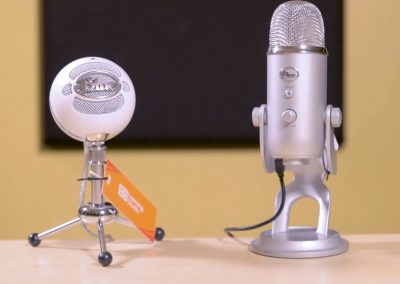
There are many simple yet effective ways to record audio using a USB microphone. In this Gear Up tutorial, John Mark Lapham will show you two high quality mic options that are available to check out from the ACU Learning Studio.

John Mark Lapham

Media Production Specialist

JohnMark-circle

Keep learning with LinkedIn Learning

Camera Movement for Video

For help with the manual controls of your DSLR, check out additional tutorials on LinkedIn Learning.

DSLR Filmmaking

If you’re ready to shoot video on a DSLR camera, this course will help you capture strong moving images.

Recording Audio for a Video Project

VIDEO TUTORIALS  /  GEAR UP

Recording Audio for a Video Project

One of the most important things to consider when you’re shooting a video is getting high quality sound. In this Gear Up installment, John Mark Lapham gives an overview of several different things to consider to ensure you get the best audio possible using equipment available to check out from The Learning Studio.

John Mark Lapham

Media Production Specialist

JohnMark-circle

Keep learning with LinkedIn Learning

Camera Movement for Video

For help with the manual controls of the 60D, check out additional tutorials on LinkedIn Learning.

DSLR Filmmaking

If you’re ready to shoot video on a DSLR camera, this course will help you capture strong moving images.

Introducing Audition

AuditionIcon

Get Audition

All Adobe CC programs are available free to ACU students, faculty and staff.

VIDEO TUTORIALS  /  BOOT CAMP

Introducing Audition

Audition offers a wide range of possibilities for the advanced user and beginner alike. In the following videos, John Mark Lapham helps newcomers kick the tires by creating a simple piece of audio from typical types of sound clips that represent a typical audio project.

John-Mark

John Mark Lapham

Media Production Specialist, Learning Studio

System Requirements

Before you begin, make sure your computer can run Audition.

TUTORIAL #1

Working with Sound Clips

In this first lesson, we’ll be taking a look at audio waveforms and learning basic editing tools like cutting, fading and setting levels to prepare for your digital project.

Download the tutorial project files to follow along during Tutorials 1 and 2.

TUTORIAL #2


Building a First Mix

In the second lesson, we’ll build our digital project using the sounds we prepared in the first lesson. Lastly, we’ll export our final audio mix that you can then add to a video project or share as a podcast.

Lost at Sea

Thanks to Dan McGregor in Art & Design for letting us build this skills challenge around his digital story “Lost at Sea.” His original illustrations work with the carefully chosen music and sound effects to set the tone for his memory of an afternoon painting with students.

Here’s the original so you can see how all the pieces fit together.

Keep learning with LinkedIn Learning

Audition CC Essential Training

A quick introduction to key features of audio editing from importing and cleaning up clips to mixing your own multi-track projects.

Audio for Video Production

This LinkedIn Learning course introduces the basics of audio on a film project, including bringing source files into Audition for clean up and effects.

Introducing Premiere Pro

PremiereIcon

Get Premiere Pro

All Adobe CC programs are available free to ACU students, faculty and staff.

VIDEO TUTORIALS  /  BOOT CAMP

Introducing Premiere Pro

Premiere Pro offers a wide range of possibilities for the advanced user and beginner alike. In the following videos, Mathew Bardwell helps newcomers kick the tires by creating a simple video with basic techniques that will come in handy in any video project.

Asia-circle200

Mathew Bardwell

Media Production Specialist, Learning Studio

System Requirements

Before you begin, make sure your computer can run Premiere Pro.

TUTORIAL #1

Building Your First Cut

In this lesson, you’ll learn to edit footage, add supporting clips (or B-roll), and export your rough cut for review.

Download the tutorial project files to follow along during Tutorials 1 and 2.

TUTORIAL #2


Working With Sound

In the second lesson, you’ll learn how to view audio waveforms and edit the audio portions of your project. You’ll also add music and a lower-third graphic to identify your interview subject. And finally, you’ll export your final video file to share with the world.

Skills Challenge

Using the project files found below, practice the skills you just learned. Edit portions of the included interview footage together to form a cohesive short segment. Then, add some supporting B-roll footage over the interview to add visual interest. Finally, try adding a music bed underneath the interview, and a lower third to identify the speaker.

Keep learning with LinkedIn Learning

Premiere Pro CC Essential Training

A fast-track approach that breaks down the entire import-to-output process into eight quick steps—ideal as an overview for new editors.

Introduction to Video Dialogue Editing

This LinkedIn Learning course explores the history of dialogue in film and introduces a workflow for effective editing of dialogue-based scenes.