

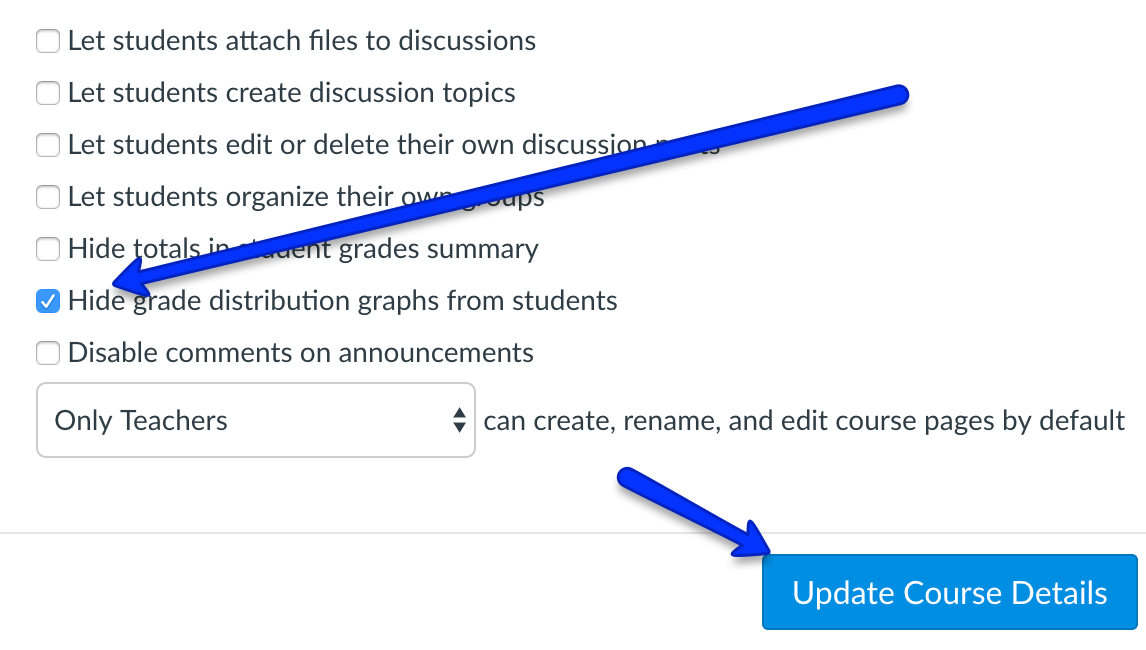
Students do not see each other’s grades, but they can see the grade distribution and where they are in the distribution. If that does not help your class, you can turn off the feature by going to course settings, and, under “advanced settings,” check to “hide grade distribution graphs from students.” Remember to “update course details” when you have done that. For more information and past tips, check here.
Recent Posts
- Student Advisory Board & Faculty Conversation Recap
- From Practice to the Podium: Supporting Student Athletes in the Classroom
- ACU Student Athletes Information Sheet
- Transparency in Class Policies: Student Fellows Session Summary
- Student Fellows Session: Engaging Course Content and Looking Toward the Future
- Knowing Your “Why” When Teaching by Logan Kindred & Britt Garland
- “and keep you:” Faculty-led student retention strategies
- Emerging HSI: Navigating Bilingualism in Classroom
- Student AI Over-reliance: What it looks like and thoughts on what to do about it
- Harnessing AI for Productivity in the Classroom
- Handling Student Medical Situations
- The After Party: Toward Better Christian Politics
- Fall 2024 Coffee Hour Sessions
- Sessions to Look Foward to this Fall
- Writing Sprint Preview
- Maximizing Learning Through Visual Aids: Principles of Presentation Design (Student Fellows Session)
- Trauma-Informed Pedagogy
- Student Perspectives on Grade Weighting: Good Form or Needing Reform?
- Student Fellows Session Summary: The Value of Classroom Discussions, Structure, and Predictability
- Student Fellows Professional Development Session Summary
- 2024 Black History Month Celebration
- AI Syllabus Statement
- Honors Colloquia and Honors Contracts: Fall 2023
- Supporting Students in College-level Reading: What We Know About Reading and Classroom Strategies for Academic Reading Success, part 2
- Supporting Students in College-level Reading: What We Know About Reading and Classroom Strategies for Academic Reading Success, part 1

